What are cold email domain variations?
Cold email domain variations refer to different domain configurations such as secondary domains or subdomains used to improve outbound outreach, protect the primary brand domain from spam filters and blacklists, and enhance deliverability.
Some of the most commonly used cold email domain variations include:
- adding subdomains such as info, hello, or support to the primary domain
- using a different top-level domain altogether.
Examples include:
- Instead of [CompanyName].com the sender might use info.[CompanyName].com
- Or they can use hello.[CompanyName].com as the domain name in the email address.
Important note: There is a risk in using cold email domain variations. There are some users who can overuse this technique, which can lead to emails being flagged as spam. Some recipients can also express skepticism over domain variations and report emails as some form of phishing attempt.
Just like other techniques, it is critical to tread on this technique as careful, deliberate, and light as possible. It has huge upside potential, but the risk can be imminent.
Step-by-step guide on how to use cold email domain variations
Step 1: Identify your primary domain and variation pool
- Decide which domain will stay clean (e.g., @brand.com for support, onboarding, and high‑value comms).
- Choose 2–5 cold‑email‑only variations (e.g., @brand.io, @brand.co, @hellobrand.com, @brandoutreach.com) that are brand-adjacent and easy to remember.
Step 2: Register and configure DNS for each variation
- Register each domain variation with reputable registrars, favoring TLDs like .com, .co, .io, and .net.
- On each domain you need to make sure that you have proper authentication protocol setup. We are talking about SPF, DKIM, DMARC, and MX Records that should be aligned with your ESP or SMTP provider.
- To give you a head start, you can check out Warmy’s SPF Record Generator and DMARC Record Generator for free.
Step 3: Warm up each email variation before scaling
Treat each domain variation as its own reputation track. You can start with low-volume, human-like activity, or you can use AI-powered email warmup tools like Warmy.
Warmy is an AI-powered email warm-up platform that automates domain reputation building for cold email senders. It creates a warmup strategy tailored to your domain’s specific behavior rather than following a fixed and generic schedule. The tool:
- Gradually increases daily sending volume
- Simulates natural interactions
- Sends replies in threads
- Marks emails as important
- Removes emails from Spam
- Maintains ongoing engagement
Additionally, Warmy monitors metrics such as inbox placement and domain reputation and adjusts sending pace accordingly..
Not sure if your domain is ready to send? Run a Free Deliverability Test with Warmy.
Step 4: Map variations to specific use cases or segments
Each variation should have a clear role. For example, you can appoint one domain for outbound cold sequences, the other for follow-ups, and the other for specific verticals, regions, or customer tiers.
This strategy helps isolate risks if ever one domain gets flagged you will have the ability to pause it while the rest of your outbound continues.
Step 5: Implement rotation logic (by domain and inbox)
Decide how you rotate your cold email domain variations. Examples include:
- Per campaign: use different domains for new sequences.
- Per day or volume window: cap sends per domain and rotates to the next when the threshold is reached.
Combine domain rotation with inbox rotation (multiple mailboxes per domain) so no single domain‑inbox pair spikes in volume or complaints.
Step 6: Monitor deliverability and health per domain
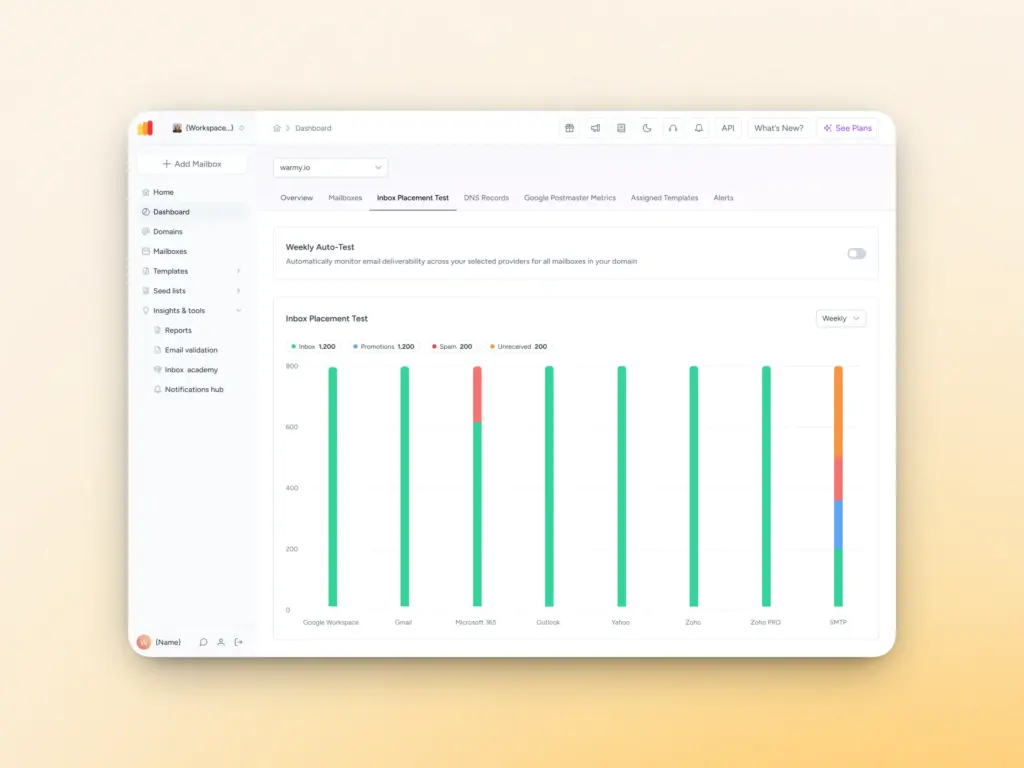
Track per-domain metrics. Warmy’s inbox placement test and Domain Health Hub work hand in hand to ensure you always know what’s going on with each of your domains.
The inbox placement test provides:
- Percentage of messages that landed in the inbox, spam folder, promotions, or unreceived across various providers
- Data on whether your sending domain or IP is flagged by any major blocklists.
- For Warmy users, the inbox placement test can be set up to automatically run on a specified weekly schedule.
Meanwhile, the Domain Health Hub is a real-time dashboard monitoring overall domain health consolidated in a single operational view:
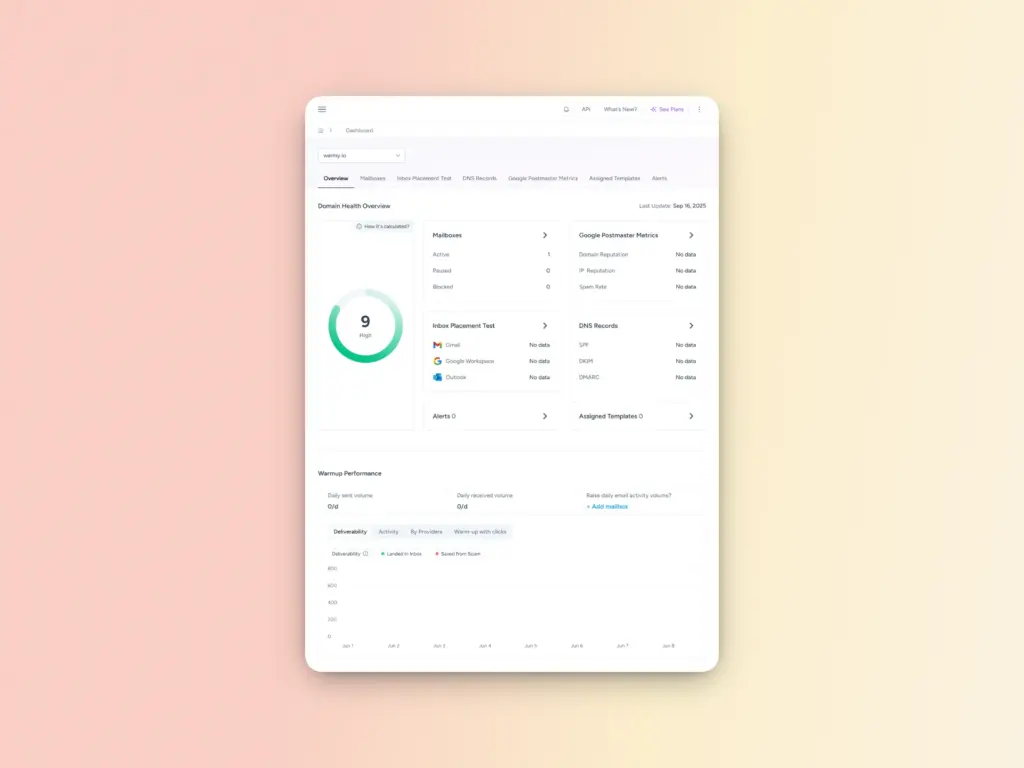
- It includes a domain health score based on a combination of various factors like authentication, blacklist status, and inbox placement tests.
- You’ll also be able to monitor your spam rate trends, overall weekly or monthly deliverability performance, and DNS status.
- Additionally, Warmy offers an optimized multi-domain monitoring so users can manage all their domains from one dashboard and identify which ones need immediate attention.
If your metrics start trending in the wrong direction, like your spam placement rate creeps up, you’ll know it early on. The timing is critical. One of the quieter signs that spam traps are on your list is a gradual erosion of deliverability that most senders don’t notice until the damage has been done.
Step 7: Pause, fix, or retire problem domains
If an email domain variation shows issues such as a sustained spam placement above your baseline, a blacklist entry or repeated spam-trap hits, or a high complaint or bounce rates then stop using it for cold sends.
Fix the root causes first, such as list hygiene, authentication, and warmup. Then, either relaunch it later or retire it and rely on healthier domains.
How to set up a cold email domain
A dedicated cold email domain should be set up like a proper business domain, just reserved for outbound outreach, not general communication.
The setup process is essentially: pick the domain → configure DNS/auth → connect to an ESP → warm it up.
1. Choose and register your domain
- Decide whether to use a variation of your brand, or a secondary domain you already own. It can also be for a specific campaign you’re running.
- Register it with a reputable registrar and remember to avoid obviously spammy‑looking TLDs when possible.
2. Setup DNS records and authentication
Every cold‑email domain must have at least SPF, DKIM, and DMARC to avoid spam‑folder landings and blacklisting.
- SPF (Sender Policy Framework)
- In your DNS dashboard, add a TXT record like:
v=spf1 include:your-esp-domain.com -all
(replace your-esp-domain.com with your provider’s SPF include, e.g., _spf.google.com for Google Workspace).
- In your DNS dashboard, add a TXT record like:
- DKIM (DomainKeys Identified Mail)
- Generate a DKIM key in your ESP or email provider; it will give you a long base64 value.
- Add a TXT record at the host selector._domainkey (or as your ESP indicates) with that key.
- DMARC (Domain‑based Message Authentication, Reporting & Conformance)
- Add a TXT record at _dmarc with a value like:
v=DMARC1; p=none; rua=mailto:dmarc@yourdomain.com - Start in p=none, monitor reports for 2–4 weeks, then move to p=quarantine and eventually p=reject once you’re confident.
- Add a TXT record at _dmarc with a value like:
- MX and other basic records
- Set MX records to your email provider (e.g., Google Workspace, Microsoft 365, Zoho) so you can receive replies and warm up the domain.
- Initiating this prevents email spoofing and phishing. Configuring these correctly ensures your emails are recognized as legitimate by email servers.
3. Connect the domain to your ESP or email tool
- Add the domain in your cold email platform (e.g., Snov, Instantly, or your in‑house SMTP), following their verification flow.
- Create outreach mailboxes (e.g., outreach@yourcoldomain.com) and ensure the platform sends and replies from that domain.
4. Warm up the domain before scaling outreach
Treat your cold‑email domain like a real user:
- Send low‑volume, high‑quality emails to your most engaged contacts.
- Encourage opens, replies, spam recovery, and marking your emails as important.
- Gradually increase volume over 2–4 weeks while watching metrics such as spam placement, bounces, and complaints.
- Explore automated tools such as Warmy to automate your warmup process.
Interested to see what an AI-powered warmup strategy looks like? Try Warmy for free today.
5. Monitor and iterate
- Track metrics per domain such as open rate, spam placement, bounce rate, complaints, and blacklist status. If a domain starts to underperform, pause sending, review list‑quality and authentication, and either fix it or rotate to a healthier domain.
- Remember to clean your email list, and remove unresponsive recipients, bounced emails, and those who’ve opted out to help maintain a good sender reputation.
- Ensure your cold emails comply with regulations like the CAN-SPAM Act or the GDPR. This includes having a clear way for recipients to opt-out and avoiding misleading headers or subject lines.
Cold email domain variations examples
Singular and plural versions:
- example.com
- examples.com
- exampleco.com
- examplecos.com
- exampleinc.com
- exampleincs.com
Subdomains:
- mail.example.com
- blog.example.com
- shop.example.com
- news.example.com
- info.example.com
Abbreviations and acronyms:
- exmpl.com
- exmplco.com
- exmplinc.com
- exmples.com
- exmplic.com
Top-level domains (TLDs):
- example.co
- example.net
- example.io
- example.org
- example.info
Misspelling and typos:
- examplle.com
- exampel.com
- exapmle.com
- examplee.com
- exampl.com
What are some of the most common mistakes when setting up a cold email domain?
These are mistakes commonly experienced when setting up a cold email domain. Use this as your guide on what not to do.
Using the main brand domain for cold email
- Never send cold outreach campaigns directly from your core @brand.com address. You can easily damage your primary domain’s reputation with spam complaints and blacklisting incidents. These can then affect other aspects of your brand such as support, onboarding, and customer comms.
- Always reserve a dedicated cold‑email domain or domain variation.
Skipping SPF, DKIM, or DMARC
- Leaving any of these unconfigured is one of the fastest paths to spam folders and being blacklisted.
- Even if your ESP “works” without them, you will lose trust signals and risk hard rejections.
Launching at high volume without warmup
- Jumping straight to sending thousands of emails from a fresh domain is another sure way of getting sent to the spam folder.
- Always start with low‑volume, human‑like activity (opens, replies, spam‑recovery) and ramp up over 2–4 weeks gradually.
Ignoring MX records and reply‑handling
- If your domain cannot receive replies or bounce messages, it comes across as a throwaway spam domain.
- Set proper MX records to your email provider so you can warm up the domain and engage with prospects.
Using spammy‑looking domains or TLDs
- Domains like brand123.net, brand.xyz, or cheapoffernet.com raise red flags and lower trust.
- Stick to clean, brand-adjacent names and reputable TLDs such as .com, .co, .io, or .net.
Over‑buying and misrotating domains
- Owning multiple similar‑sounding domains and scattering tiny sends across them can look like an evasion tactic.
- Operators may treat this pattern as suspicious, even if each domain is technically “clean.”
- Focus on a small, well‑managed pool rather than a bloated domain farm.
Not monitoring domain‑level metrics
- Failing to track spam placement rates, bounce rates, spam complaint rates, and blacklist incidents per domain means you won’t see problems until deliverability collapses.
- Make domain‑health checks part of your routine. Warmy’s Domain Health Hub makes this easier for high volume senders and agencies managing multiple domains
- Additionally, Warmy’s Workspace Management feature provides a single interface for managing multiple client mailboxes, with visibility across warmup activity, health data, and placement results.
Reusing poorly‑maintained lists on a new domain
- A fresh domain won’t magically “reset” bad list hygiene. If you run dirty, scraped, or long‑untouched lists through a new domain, you’ll quickly re‑create the same issues.
- Clean your lists and warm up the domain properly.
What does the future of using cold email domain variations look like?
Here are some of our bold predictions on future trends surrounding the use of cold email domains:
- Domain and IP reputation scrutiny will tighten. ISPs and inbox providers are increasingly combining domain‑level behavior, complaint rates, and authentication signals into a single “trust score.” New or lightly‑used domains will face extra scrutiny, and poor reputation on one domain can spill over to similar‑sounding domains.
- Domain-aging and proper warmup will be table stakes. Currently, domain history and email warmup prove to contribute to a positive sender reputation. In the near future, these best practices might as well be non-negotiable. “Cold start” domains (no history, no warmup) will be more likely to be throttled or blocked. Expect best practices to evolve into mandatory not just a “nice‑to‑have.”
- Increased spotlight on domain‑health monitoring and automatic alerts. Platforms will increasingly bundle continuous domain‑health checks: authentication audits, blacklist status, DNS‑record drift, and reputation‑score trends. Teams will rely on alerts and dashboards rather than manual checks.
- Smarter domain and inbox rotation. Deliverability‑focused tools will move from static rotation rules to AI‑driven domain‑and‑inbox orchestration, dynamically shifting volume based on real‑time engagement, spam‑placement, and complaint signals.
- Stricter enforcement of SPF/DKIM/DMARC. Authentication will stop being “optional” even for low‑volume senders. Major providers will keep tightening DMARC‑based filtering and treat missing or misconfigured records as a red flag, especially for domains with spikes in volume.
- More domain‑focused consent and list hygiene. As regulators and inbox operators push back on consent‑laundering and scraped lists, cold‑email stacks will need to prove cleaner, more traceable data sources. This will push domain‑level deliverability toward consent‑verified, opted‑in segments rather than “spray‑and‑pray” lists.
- Fewer “domain farms” and more domain discipline. The practice of owning dozens of nearly identical domains to scatter sends will increasingly look like an evasion tactic. Senders will be rewarded for a smaller, well‑managed portfolio of domains with strong warmup, clear ownership, and clean DNS‑health.
Ready to scale cold outreach? Start with the right domain setup
Warming up your cold email domain variations is a proven solution to ensure that your domains are ready for large-scale outreach.
Discover how Warmy can optimize your domains for peak performance and maximize the impact of your email outreach. Start your domain warmup journey today and transform your cold email strategy!
FAQ
How many cold email domains do I need?
Most senders do well with 2–5 dedicated cold email domains. A good rule of thumb is one domain per 30–50 daily emails you plan to send. This keeps volume per domain low, reduces spam risk, and gives you healthy rotation options if one domain gets flagged or needs to be paused.
Can I use my main business domain for cold email outreach?
You should never use your primary domain for cold outreach. If it gets flagged or blacklisted, it affects every email your business sends. This includes receipts, support replies, and onboarding sequences. Always use a dedicated cold email domain or variation to keep your core domain reputation clean.
How long does it take to warm up a cold email domain?
A proper domain warmup takes between 2 and 4 weeks, starting with low daily send volumes (10–20 emails) and gradually increasing from there. Skipping or rushing the warmup is one of the most common reasons fresh domains get flagged as spam almost immediately. Tools like Warmy automate this process and adjust the ramp based on real-time domain signals.
What is the difference between a subdomain and an alternative domain for cold email?
A subdomain (e.g., outreach.brand.com) sits under your primary domain, while an alternative domain (e.g., brand.io or hellobrand.com) is a completely separate domain. Alternative domains offer better reputation isolation. If one is blacklisted, it has no direct impact on your primary domain. Subdomains are quicker to set up but carry more shared risk.
Do cold email domain variations still work in 2025?
Yes, but the bar is higher than it used to be. Inbox providers now apply stricter authentication checks, reputation scoring, and DMARC enforcement across all sending domains. Domain variations work best when each one is properly authenticated, warmed up, and monitored—not treated as throwaway addresses to cycle through when one burns out.